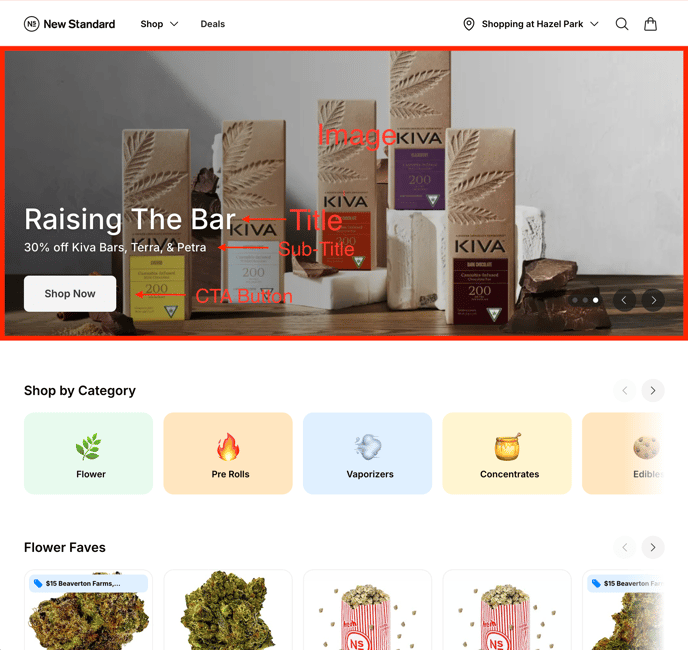
Hero Banners within your Superbud eCom instance are displayed at the top of your shop's primary landing page and can be customized to meet your needs.
Every eCom Hero Banner consists of FIVE primary parts:
- Image
- 16:9 Aspect ratio photography focused images are recommended with limited copy and text on the image itself.
- Banners are dynamic and change in size based on the device that they are viewed upon. Depending on the device, copy within the image itself may be cutoff.
- Title
- Use the title to make an impact on your and draw them. You can use this space to bring in a catchy brand-specific tagline or attention grabbing deal.
- Sub-Title
- If the title is utilized for brand copy, use this space to highlight the offer specifics. If you're highlighting the offer specifics within your Title, this copy could be eliminated.
- CTA Button
- The text within the CTA button can be customized to reflect the brand your promoting within your banner (i.e. "Shop Kiva") or if you're promoting multiple brands or deals within the space you can keep it open (i.e. "Shop Now"). Either way you'll want to use this copy to drive your Shopper to do some sort of action like "Shop" or "Buy".
- CTA Button URL Redirect
- The CTA Button is clickable and direct Shoppers anywhere within your eCom instance. To ease the Shopper's path to purchase and promote conversion, we recommend directing Shoppers to a product page filtered for the brand and category being promoted (i.e. Kiva & Edibles), or directly to the deal page itself.
We recommend that each Hero Banner include all of the above elements for conversion optimization, but the bare minimum needed for each banner is only an image.