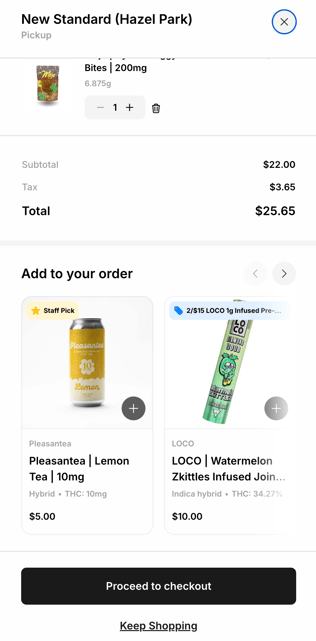
Staff pick items appear in multiple locations across your Shop including on product cards on shopping pages, a homepage carousel, & the add-on carousel within the cart.
Staff pick items are flagged across your Superbud Shop page with a yellow flag on their product card and product pages.
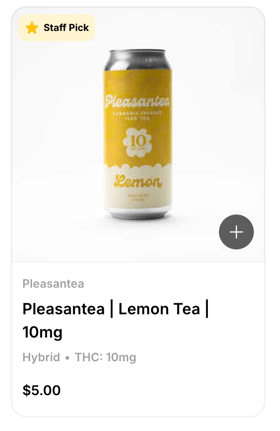
Product flags, such as the yellow "Staff Pick" flag noted above are limited to only displaying one per product on the product cards. "Deal" flags take priority over "Staff Picks" and will be displayed instead of a "Staff Pick" in the event that a deal is also being offered on a staff pick item.
Staff Picks are also displayed on multiple carousels across your Shop. Items to be displayed on these carousels have to meet (2) requirements:
- Marked as a Staff Pick in your Dutchie Admin console.
- Priced at $25 or less.

The "Staff Picks Under $25" carousel is one of the primary homepage carousels within your Shop. It appears just below the "Shop By Brands" carousel and above the footer. If no Staff Pick items are selected in your Dutchie Admin console that are under $25, this carousel simply will just not appear.
Always ensure items that meet the "Staff Pick" and "Under $25" requirement are selected in your Dutchie Admin console to ensure that this carousel displays for the most complete eCom experience that has proven to convert.
It's best to include variety of different product categories represented in this carousel to meet a variety of Shopper needs, but feel free to get creative with how you select these items. This is a great opportunity to bring items to your homepage and make them front and center with your Shoppers. Items that drive a higher margin, are supported by your brand partners, or items soon to expire are all great options to feature here.
The "Staff Picks Under $25" carousel also appears in your Shopper's cart immediately prior to checkout. These same items have proven to drive upsell conversions and give them an additional Shopper touchpoint for these items immediately prior to checkout.